
Operating and Optimizing Your Push-Back Pallet Rack System

How To Increase Productivity And Worker Safety With Push-Back Storage
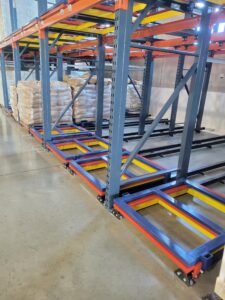
Push-back racking works by storing pallets on nested wheeled carts that travel along inclined rails. This allows each newly loaded pallet to push the previous pallet back while stored pallets flow forward for Last-In, First-Out retrieval.
A well-designed and well-operated push-back rack system can help your team increase storage density, reduce forklift travel, and help support smoother, safer, and more productive pallet movement. We saw how this deeper storage layout can more than double pallet capacity compared to the standard selective rack when the inventory profile is a good fit.
Key Takeaway: Push-back racking rewards good habits and punishes bad ones. This guide gives your team the correct procedures for loading, unloading, and troubleshooting pallet hang-ups — protecting your product, rack, and people while keeping pallets flowing.
How Does a Push-Back Rack System Work?
A push-back rack system uses a series of nested wheeled carts set on slightly inclined rails. The rails are installed so pallets naturally flow toward the aisle face when the front pallet is removed.
Here is the basic flow:
- The first pallet is placed on the top cart.
- The second pallet pushes the first pallet back and sits on the next cart.
- Each additional pallet continues the sequence until the lane is full.
- The rear pallet may sit directly on the rails, depending on the system depth and design.
- When the front pallet is removed, the rear pallets and carts glide forward toward the pick aisle.
Because loading and unloading happen from the same side, push-back pallet rack supports Last-In, First-Out inventory rotation. It also keeps forklifts out of the rack structure, which helps reduce rack impact when operators are properly trained and the system is maintained.
Apex’s push-back pallet rack training video covers operating procedures, system loading and unloading, purging hang-ups, and safe debris removal. It is a helpful resource for warehouse teams that operate push-back racking every day.
What Should Operators Check Before Loading Push-Back Pallet Rack?
Before loading a push-back rack system, operators should complete a quick visual check of the forklift, pallet, load, and lane. These basic steps help prevent pallet hang-ups, product damage, and unnecessary downtime.
To do it right, start with these operating checks:
- Confirm forklift operator training.
Forklift operators should be trained and evaluated under your facility’s powered industrial truck program before operating around push-back racking. - Check pallet quality.
Use quality GMA-style wood pallets or approved plastic pallets. Avoid pallets with loose boards, missing boards, broken stringers, or other damage that could interfere with the carts or rails. - Review the product load.
Check for load overhang, loose cartons, hanging flaps, torn stretch wrap, or anything that could catch on the rack, cart, rail, or adjacent load. - Confirm the load weight.
Make sure the pallet load is within the rated capacity of the push-back rack system. - Look for debris in the lane.
Shrink wrap, pallet wood, loose boards, labels, and packaging debris can prevent carts from traveling correctly. Keep lanes clean and clear.
Push-back racking is designed to do a lot of work for your warehouse. But like any dynamic pallet rack system, it performs best when pallet quality and operator habits are consistent.
How Do You Load a Push-Back Rack System?
Proper loading keeps the pallet centered, protects the carts and rails, and helps the system flow as designed. Follow these basic push-back rack loading steps:
- Approach the lane slowly and squarely.
Center the forklift with the lane before entering the system. Keep the pallet level and controlled. - Lift the pallet above the first cart.
Raise the pallet load approximately 3 to 4 inches above the first cart, then enter the lane and place the pallet centered on the cart. - Back out slowly.
Once the first pallet is properly placed, slowly back out of the system. - Load the second pallet.
Line up the bottom boards of the second pallet with the bottom boards of the first pallet. Gently push the first pallet back as you center the second pallet over the exposed cart. - Continue the sequence.
Repeat the same controlled motion for each pallet until the lane is loaded. - Place the final pallet correctly.
The last pallet may sit directly on the push-back rails instead of a cart. Make sure the load is centered in the lane and positioned behind the pallet stops.
Smooth loading protects the rack, the pallets, the product, and the people working around the aisle.
How Do You Unload a Push-Back Pallet Rack?
Unloading a push-back rack system is just as important as loading it correctly. When the front pallet is removed, the pallets behind it are designed to glide forward.
Follow these basic unloading steps:
- Center the forklift with the front pallet: Approach the lane squarely and slowly. Enter the lane with control.
- Lift the front pallet slightly: Raise the pallet approximately 3 to 4 inches so it clears pallet stops or other obstructions.
- Extract the pallet slowly: Back out of the lane at a controlled speed. This allows the carts and remaining pallets to glide forward toward the aisle face.
- Control the flow: Do not pull away too quickly. The operator controls the speed of the rear pallets by backing out slowly and evenly.
- Repeat for the remaining pallets: Continue the same process until the lane is empty or the required pallets have been removed.
How Do You Prevent Push-Back Rack Hang-Ups?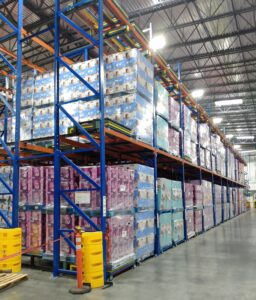
Most push-back rack hang-ups are preventable. They often come from damaged pallets, loose packaging, debris, poor pallet placement, or loads that are not centered correctly in the lane.
To help prevent hang-ups:
- Use consistent pallet sizes.
- Avoid damaged pallets.
- Keep bottom boards intact.
- Remove loose stretch wrap before loading.
- Make sure loads are not overhanging.
- Keep pallet weights within system capacity.
- Center each pallet in the lane.
- Keep carts, rails, and pallet stops free from debris.
- Train operators to load and unload slowly.
If a hang-up occurs, follow your facility’s safety procedure and the Apex training guidance to purge the system and remove debris. Only trained personnel should troubleshoot a push-back rack issue, especially when loaded pallets are involved.
A few minutes of proper inspection can save a lot more than a few minutes of downtime. It can also help protect your rack, product, forklift operators, and warehouse team.
How Do You Keep a Push-Back Rack System Optimized?
A push-back rack system is built for busy warehouse environments, but it still needs routine attention. To keep LIFO pallet racking safe and productive, build these habits into regular operations:
- Inspect push-back lanes for debris.
- Look for damaged carts, rails, pallet stops, uprights, and beams.
- Review pallet quality before loading.
- Keep loads wrapped cleanly and contained.
- Make sure forklift operators understand proper loading depth and cart placement.
- Confirm lane labels and SKU assignments are clear.
- Keep high-volume SKUs in the right push-back lanes.
- Review whether the system is still matching your inventory mix.
That last point matters. A push-back pallet rack system is ideal for high-volume, low- to moderate-SKU storage where multiple pallets of the same product can be stored in a dedicated lane. If your SKU mix changes, your rack layout may need to be reviewed as well.
Push-Back Pallet Rack Guide: Quick FAQ
What is push-back racking used for?
Push-back racking is used for high-density pallet storage where multiple pallets of the same SKU can be stored in a lane. It is commonly used when a warehouse needs more pallet positions but still wants organized SKU lanes and single-aisle access.
Is push-back racking LIFO or FIFO?
Push-back racking is primarily a LIFO pallet racking system. The last pallet loaded into the lane is typically the first pallet removed. FIFO may be possible only through careful batched inventory control by lane, but push-back is best suited for LIFO storage needs.
How deep can a push-back rack system go?
Push-back rack systems are commonly designed for multiple pallet positions per lane, often 2 to 7 pallets deep, depending on pallet size, weight, product profile, rack design, forklift access, and facility layout.
What causes push-back pallet rack hang-ups?
Common causes include damaged pallets, missing or loose pallet boards, stretch wrap or packaging debris, off-center loading, load overhang, and pallet weights or dimensions that do not match the system design.
How often should push-back racking be inspected?
Push-back racking should be visually checked during regular warehouse operations and reviewed as part of your facility’s rack maintenance program. Operators should report damaged components, debris, cart issues, pallet damage, or lane flow problems as soon as they are noticed.
Need Help Keeping Your Push-Back System on Track?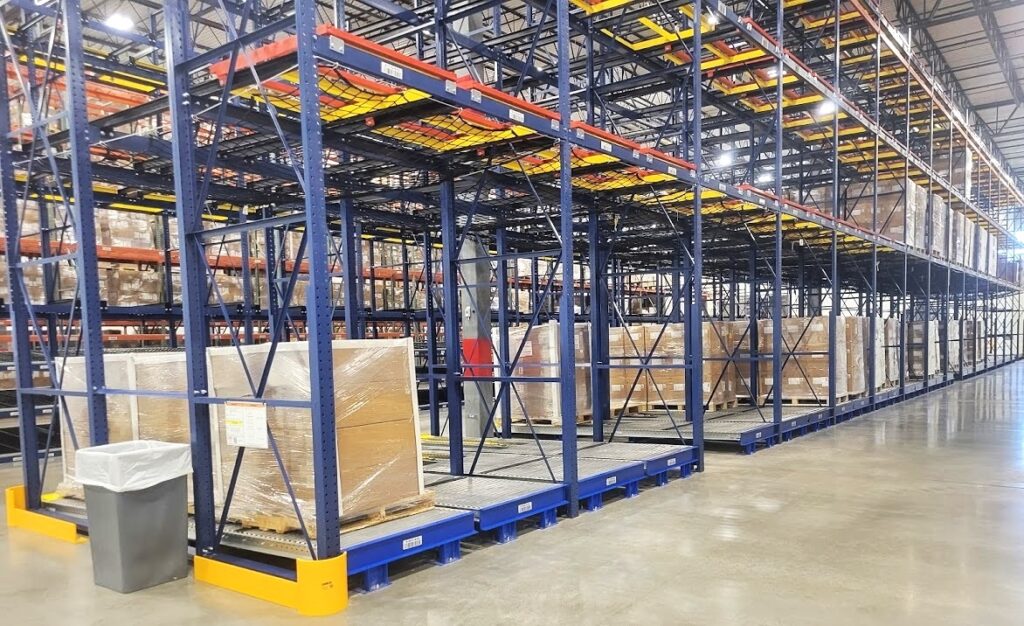
A properly designed push-back rack system can do a lot for your warehouse: more storage density, smoother pallet flow, reduced forklift travel, and better use of your existing space.
But the system works best when your team knows how to operate it, inspect it, and keep it clear of the little things that cause big headaches. Loose stretch wrap, broken pallet boards, off-center loads… they may look small until they slow down an entire lane.
Apex Companies can help with push-back rack design, installation, training support, inspection, repair, and maintenance. Give us a call, and let’s keep your push-back pallet rack system running safely, smoothly, and right on track.
