
Welcome to the Apex Accounting Resources Portal

Pay. Track. Manage—All in One Place.
Keeping up with invoices, payments, and account activity shouldn’t take extra time. The Apex Accounting Resources Portal gives you a single, self-service place to pay invoices, track payments, and review account history online, with a single point of access across Apex business units (warehouse design & storage, installations & repairs, and material handling equipment).
To join our new portal, simply email ar@apex-cos.com. Once you’re set up, you can access the portal from the Accounting Resources Portal link in the footer of any Apex website page.
Your Central Hub for Invoices & Payments
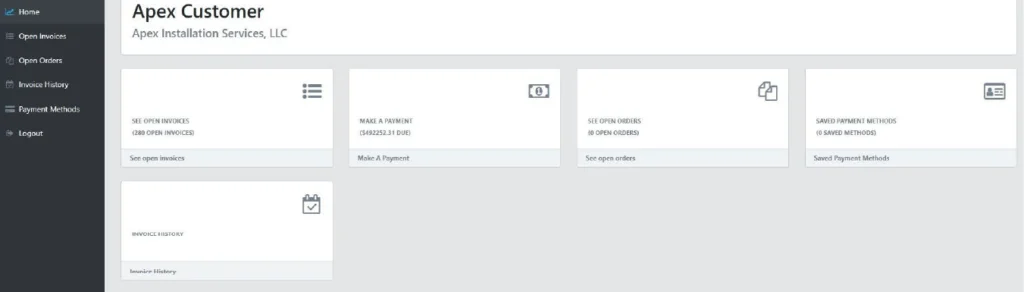
Inside the portal, you can quickly get clarity on: what’s due, what’s paid, and what’s next.
Here’s what you can do at a glance:
- View and pay open invoices
- Track payments and review what’s been paid
- Search invoices by date range and document number
- View open quotes and view shipments
- Securely manage saved payment methods (Credit Card and ACH)
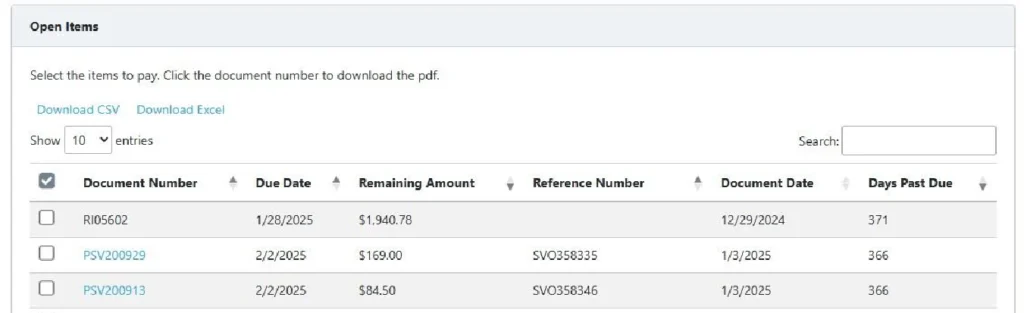
Paying Open Invoices (Quick Steps)
Paying an invoice is straightforward:
- Go to Open Invoices to see outstanding items.
- Click the box on the left to select the invoice(s) you want to pay.
- Enter the amount due.
- Choose your payment method and submit payment.
After payment is submitted, your payments and activity records are updated, so you can track status and history. You can also download invoice PDFs if desired.
Look Up a Past Invoice or Payment

Use Invoice History to search past invoices and view payment details.
- Select a Date Range – choose From & To dates
- Enter Document Number (optional) – search by invoice or document ID
- Click Search
- Click Amount Paid – view documents associated with that payment
Manage Payment Methods
In the Payment Methods area, you can:
- Add Credit Card and ACH payment methods
- A 3% fee will apply to all Credit Card transactions; to avoid this fee, please pay by ACH
- For single invoices or lump-sum payments over $50,000, contact us to arrange an alternate payment plan (if not already established).
- Per transaction limit: $100,000
- View and delete previous user profiles
Ready to Join the Account Resources Portal?
The Accounting Resources Portal is designed to give you clarity and control over your Apex billing. From open invoices to payment status and history, you’ll have a clear view of what’s happening and what’s next.
When you’re ready, email ar@apex-cos.com to join our new resources portal today.
