
Easy Does It! Load & Unload Your Drive-In Rack Safely

Apex Colorado Experts Share Drive-In Rack Loading & Unloading Instructions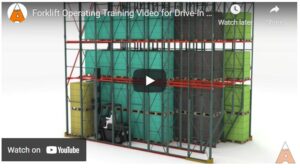
Easy does it is the name of the game with drive-in pallet racking. The high-density system is a cost-effective storage solution in terms of the number of pallet positions for the space required; however, you will need skilled forklift operators to load and extract pallets –here’s why.
As the name implies, drive-in rack requires operators to fully enter the rack lanes to load and extract pallets. This process makes your system more vulnerable to accidental damage, but with so many benefits of the rack system, it is worth focused driver training. We can help. The Apex team put together a forklift operator training video to show the steps for safe loading and unloading. Also included are important cautions and considerations.
Take a look:
Ready, Set, Train — Not So Fast!
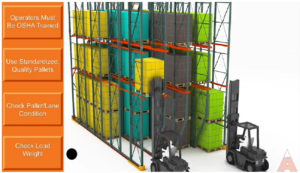 First things first, ensure your warehouse safety measures are in place for training and system use.
- Forklift operators must be OSHA certified
- Pallets MUST be the same size and of good quality
- Do not place damaged pallets in the lane –check pallets for broken, missing boards
- Confirm load weight is under the rated system capacity
Loading Drive-In Rack
- Square the forklift with the opening of the drive-in lane.
- Always load pallets from the FLOOR and go up. Start with the last (or furthest) location.
- The first pallet will likely be placed on the floor and potentially stacked two high.
- To place a pallet on the rails, lift the pallet 3” to 4” above rail level.
- Slowly drive to the last open pallet position, carefully lower the pallet onto the rails, and slowly back out of the system.
- Lower the forklift mast. Never drive with the mast extended.
- Ensure forks are clear of the rack before turning in the aisle.
- Continue to load pallets – floor up/and from BACK to FRONT until the lane is full.
Unloading Drive-In Rack
- Drive into the lane with the forks elevated to the height of the pallet to be removed.
- Secure the pallet on the forks and raise it approximately 3” to 4” above the rails.
- Slowly back out of the lane.
- Lower the forklift mast. Never drive with the mast extended.
- Ensure forks are clear of the rack before turning in the aisle.
What Can Go Wrong — How to Fix It

Misaligned Pallet
Even with proper training, occasionally something can go awry. It’s best to know how to deal with challenges before they arise.

Sloped Leg Drive-In Rack
Misaligned Pallets – If the pallet isn’t centered on the drive-in rails it is considered misaligned and must be reset.
Fixing a misaligned pallet:
- Drive into the rack
- Secure the pallet on the forks
- Center it within the lane
- Lower it back onto the rails
NEVER Push or Pull Pallets – It is NEVER acceptable to push or pull pallets along the rails, hoping they will “fall into place.” Pushing and pulling pallets along the drive-in rails stresses the system and can shift the pallet to release and fall. This is a common practice, unfortunately, and can have catastrophic results.
Pallet Quality – pallets must be uniform in size, and load weights must comply with rated pallet and system capacities. Never use weak or damaged pallets in the drive-in rack.
Turn Radius – Drivers must carefully consider the turn radius when leaving the rack system. One way to minimize the potential for forklift vs. rack accidents is to design your drive-in rack system with a recessed front column. This design provides better maneuverability for the forklift by removing the lower portion of the front column from the aisle.
The Apex Colorado team can help you with system design and or training for your drive-in rack. If you need help with system maintenance and repairs, you can also rely on the Apex team. We are your local source of full-service support for all your warehousing needs.
